01/23/2026 4:51 PM
The Ultimate PayloadCMS Guide to PDF Generation: Building Visual Templates with PDFMe and Forms
7 minutes
Stop wrestling with HTML-to-PDF layouts. Learn how to integrate the PDFMe visual Designer & Form into PayloadCMS, allowing users to design templates and fill placeholders through interactive forms for seamless document generation.

Ravi
CTO
In a modern CMS, data shouldn't be trapped on the screen. Whether it's for invoices or legal contracts, generating professional PDFs is a core requirement for sharing data with customers and partners. By integrating the PDFMe Designer into PayloadCMS, we’ve moved beyond rigid, hard-coded templates. This setup empowers consultants to visually design their own layouts and map arbitrary values via interactive forms—a massive win for complex workflows that require more flexibility than just basic {customerName} and {address} variables.
To ensure this remains performant at scale, we handle the heavy lifting in the background using Payload’s Jobs Queue. By implementing content hashing, we avoid the overhead of re-generating identical documents, while automatically generating thumbnails to provide a seamless visual preview within the CMS.
Integrating the PDFMe Designer
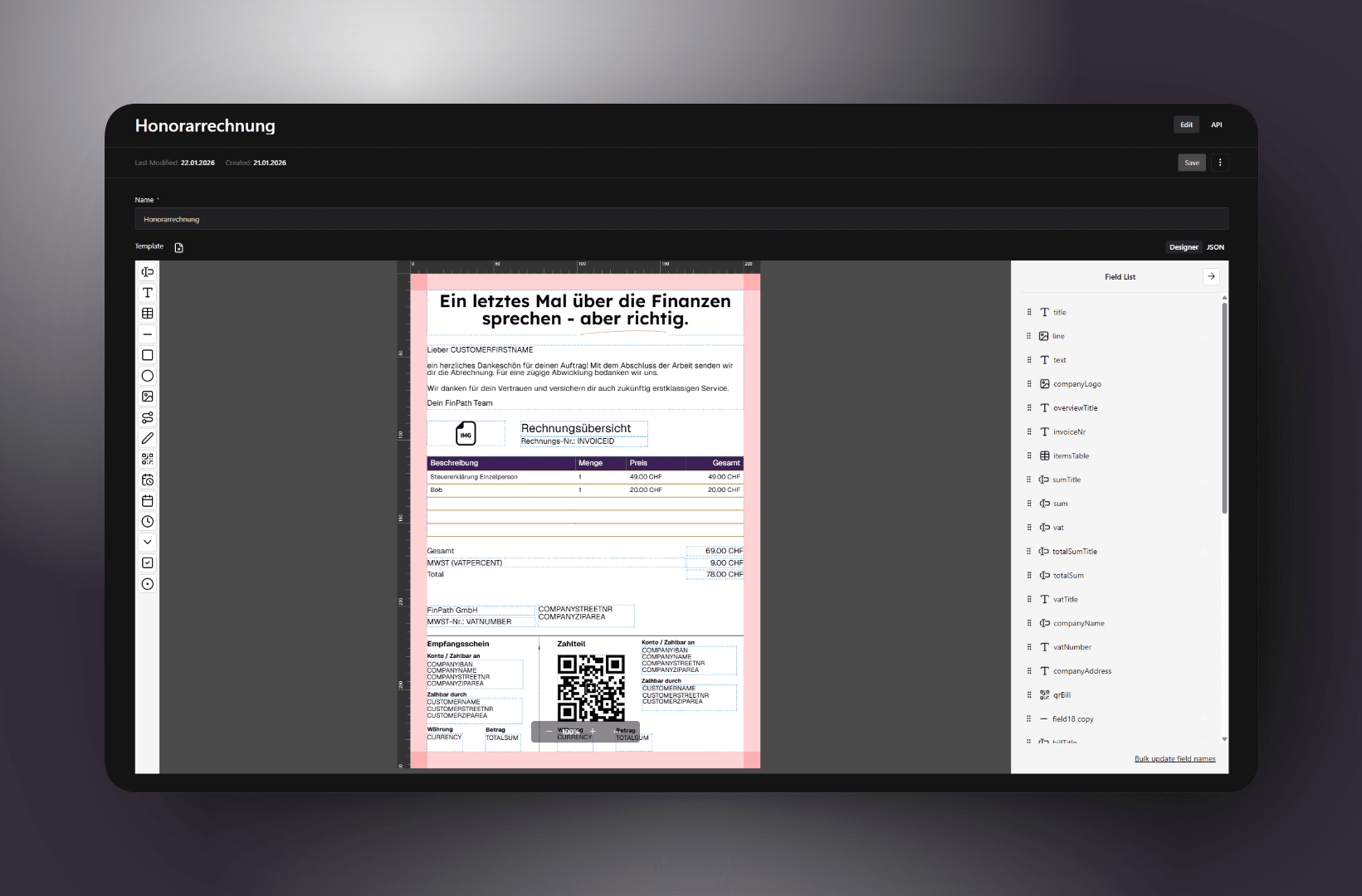
The core of this integration is the PDFMe Designer. Unlike traditional engines that require you to code layouts in HTML or LaTeX, PDFMe allows users to visually drag and drop fields onto a base PDF. These fields range from standard text and multi-variable blocks to more dynamic elements like images and QR codes.
The real power lies in the field settings: any element can be marked as editable. When a field is editable, the generation pipeline treats its name as a key. During document generation, we look for a matching variable to swap into that placeholder. If it's not marked as editable, the content remains static—perfect for fixed labels or brand assets.
Storing the Template
PDFMe uses a specific Template type that bundles the basePDF (a data URI or URL) and a schema (the coordinates and settings of all fields). Since this is all structured data, Payload’s json field is the perfect place to store it.
Here is the collection configuration to get started:
1export const DocumentTemplate: CollectionConfig = {
2  slug: "document-templates",
3  admin: {
4    useAsTitle: "name",
5    group: "Admin",
6    hidden: isAdmin.hidden,
7    defaultColumns: ["name"],
8  },
9  labels: {
10    singular: "Dokumentvorlage",
11    plural: "Dokumentvorlagen",
12  },
13  access: isAdmin,
14  fields: [
15    { name: "name", type: "text", required: true },
16    {
17      name: "template",
18      type: "json",
19      admin: {
20        components: {
21          Field: "@/components/admin/pdfme/designer",
22        },
23      },
24      required: true,
25    },
26  ],
27};
Building the Designer Component
By overriding the Field component in the admin config, we can render the PDFMe Designer directly within the Payload Admin UI. This allows consultants to tweak layouts in real-time without ever leaving the CMS. The following component acts as the bridge, using Payload’s useField hook to keep the visual designer in perfect sync with the collection's JSON state.
Key Implementation Details:
- Bidirectional Sync: It uses
initialValueto populate the designer andsetValueto push changes back to Payload’s form state. - Designer & JSON View: A "tabbed" interface allows you to toggle between the visual Designer and the standard JSONField for those moments when you need to inspect the raw schema.
- Font Consistency: The
getFonthelper loads brand fonts (Geist, Lexend) as Base64 data URIs from the server. This ensures that the designer and the background generator use the exact same font dictionary, so the layout a user sees in the CMS matches the final PDF perfectly. - Lifecycle Control: Using
useReffor the designer instance and a cleanup function ensures that the designer is properly destroyed when the component unmounts, preventing memory leaks within the Payload admin UI.
1"use client";
2
3import { getFont } from "@/lib/pdfme/fonts";
4import plugins from "@/lib/pdfme/plugins";
5import { cn } from "@heroui/react";
6import { getTranslation } from "@payloadcms/translations";
7import {
8  Button,
9  JSONField,
10  useField,
11  useForm,
12  useTranslation,
13} from "@payloadcms/ui";
14import { BLANK_A4_PDF, Font, Template } from "@pdfme/common";
15
16import { Designer } from "@pdfme/ui";
17import { FileX } from "lucide-react";
18import { JSONFieldClientProps } from "payload";
19import { useEffect, useRef, useState } from "react";
20
21export default function PDFMeDesigner({
22  path,
23  field: { label, ...field },
24}: JSONFieldClientProps) {
25  const [mode, setMode] = useState<"designer" | "json">("designer");
26  const [font, setFont] = useState<Font>();
27
28  const { i18n } = useTranslation();
29
30  const { submit } = useForm();
31  const { initialValue, setValue } = useField<Template>({ path });
32
33  const containerRef = useRef<HTMLDivElement>(null);
34  const designerRef = useRef<Designer>(null);
35
36  useEffect(() => {
37    if (mode === "designer" && containerRef.current && !designerRef.current) {
38      designerRef.current = new Designer({
39        domContainer: containerRef.current,
40        plugins,
41        template:
42          initialValue ??
43          ({
44            schemas: [[]],
45            basePdf: BLANK_A4_PDF,
46          } satisfies Template),
47        options: { font },
48      });
49
50      if (!font) {
51        getFont().then((font) => {
52          setFont(font);
53          designerRef.current?.updateOptions({ font });
54        });
55      }
56    }
57
58    designerRef.current?.onSaveTemplate(() => submit());
59    designerRef.current?.onChangeTemplate(setValue);
60
61    return () => {
62      designerRef.current?.destroy();
63      designerRef.current = null;
64    };
65  }, [containerRef, designerRef, initialValue, submit, setValue, mode]);
66
67  const onResetTemplate = () => {
68    if (designerRef.current) {
69      designerRef.current.updateTemplate({
70        schemas: [[]],
71        basePdf: BLANK_A4_PDF,
72      } satisfies Template);
73    }
74  };
75
76  return (
77    <div className="h-screen flex flex-col gap-4">
78      <div className="flex justify-between items-end">
79        <div className="flex gap-2">
80          {label && <p>{getTranslation(label, i18n)}</p>}
81
82          <div className="flex">
83            <Button
84              buttonStyle="icon-label"
85              className="my-0 py-0"
86              onClick={onResetTemplate}
87            >
88              <FileX className="size-6" />
89            </Button>
90          </div>
91        </div>
92
93        <div className="flex">
94          <Button
95            size="small"
96            buttonStyle="tab"
97            className={cn(
98              "my-0",
99              mode === "designer" && "bg-zinc-200 dark:bg-zinc-800",
100            )}
101            onClick={() => setMode("designer")}
102          >
103            Designer
104          </Button>
105          <Button
106            size="small"
107            buttonStyle="tab"
108            className={cn(
109              "my-0",
110              mode === "json" && "bg-zinc-200 dark:bg-zinc-800",
111            )}
112            onClick={() => setMode("json")}
113          >
114            JSON
115          </Button>
116        </div>
117      </div>
118      {mode === "designer" ? (
119        <div ref={containerRef} className="flex-1" />
120      ) : (
121        <JSONField path={path} field={field} />
122      )}
123    </div>
124  );
125}
Connecting Templates to Documents
Once the templates are ready, we need a way to actually use them. We do this by creating a Documents collection. This collection acts as the junction point where a Template, a Customer, and specific User Inputs meet.
By associating each document with a customer, we ensure that central data (like billing addresses or contact names) can be automatically injected. The inputs field is where the real interaction happens: we replace the standard JSON editor with the PDFMe Form component. This allows the user to fill out the template’s placeholders with immediate visual feedback—they can see exactly how the final PDF will look as they type.
1export const Document: CollectionConfig = {
2  slug: "documents",
3  admin: {
4    useAsTitle: "name",
5    group: "CRM",
6    defaultColumns: ["name", "customer", "template"],
7  },
8  labels: {
9    singular: "Dokument",
10    plural: "Dokumente",
11  },
12  access: isConsultant,
13  upload: {
14    staticDir: "documents",
15    hideFileInputOnCreate: true,
16    adminThumbnail: ({ doc }) =>
17      (doc as unknown as IDocument).thumbnail
18        ? getPublicURL(
19            `/api/media/file/${getDocumentThumbnailName(doc as unknown as IDocument)}`,
20          ).toString()
21        : getPublicURL("/icons/file-spreadsheet.png").toString(),
22  },
23  versions: {
24    drafts: {
25      autosave: {
26        interval: 375,
27      },
28    },
29  },
30  fields: [
31    { name: "name", type: "text", required: true },
32    {
33      name: "customer",
34      type: "relationship",
35      relationTo: "customers",
36      required: true,
37    },
38    {
39      name: "inputs",
40      type: "json",
41      admin: {
42        components: {
43          Field: "@/components/admin/pdfme/form",
44        },
45      },
46      defaultValue: [{}],
47      required: true,
48    },
49    {
50      name: "template",
51      type: "relationship",
52      relationTo: "document-templates",
53      required: true,
54    },
55    {
56      name: "hash",
57      type: "textarea",
58      admin: { hidden: true },
59    },
60  ],
61  hooks: {
62    beforeChange: [
63      stableHashHook<IDocument>({
64        staticFields: ["name", "inputs"],
65        fields: {
66          customer: ({ data: { customer } }) =>
67            isEntity(customer) ? customer.id : customer,
68          template: ({ data: { template } }) =>
69            isEntity(template) ? template.id : template,
70        },
71        skipDrafts: true,
72      }),
73    ],
74    afterChange: [
75      async ({ previousDoc, doc, req: { payload } }) => {
76        if (doc.hash === previousDoc.hash || doc._status !== "published") {
77          return;
78        }
79
80        await payload.jobs.queue({
81          task: "generateDocument",
82          input: { document: doc },
83          waitUntil:
84            process.env.NODE_ENV !== "development"
85              ? add(new Date(), { minutes: 10 })
86              : undefined,
87        });
88      },
89    ] satisfies CollectionAfterChangeHook<IDocument>[],
90  },
91};
Automation and Efficiency
To make the system production-grade, we’ve added two important logical layers:
- Hashing for Optimization: We use a
stableHashHookto generate a unique hash of the document's content (including inputs and relationships). If a user saves the document without changing any actual data, the hash remains the same. This allows us to skip expensive PDF re-generation cycles. - Background Processing: Generating PDFs can be resource-intensive. Instead of making the user wait for the file to be created, the
afterChangehook triggers a Payload Job. This queues thegenerateDocumenttask to run in the background as soon as the document is published.
The Interactive Form Component
While the Designer is for building the blueprint, the Form component is what the consultant uses day-to-day. It automatically interprets the template's schema and generates a corresponding UI. If your template has five text fields and an image placeholder, the form renders five text inputs and an image uploader.
Key Technical Highlights:
- Real-time Data Fetching: We use the
usePayloadAPIhook to dynamically fetch the selected Template and Customer data as the user interacts with the Payload form. This ensures the PDFMe Form always has the latest schema to work with. - Customer Variable Injection: The helper
getCustomerVariables(customer)prepopulates the form with existing CRM data. This means the consultant starts with a partially filled document, only needing to provide the "arbitrary" values specific to this instance. - Dynamic UI Scaling: Using
MutationObserverandResizeObserver, the component ensures the PDFMe iframe-like container scales its height to match the generated form content, preventing awkward double-scrollbars within the Payload Admin UI. - Granular State Updates: The
onChangeInputlistener carefully maps PDFMe’s internal change events back to Payload's JSON field state, ensuring that every keystroke is captured for the final generation.
1"use client";
2
3import plugins from "@/lib/pdfme/plugins";
4import {
5  Button,
6  JSONField,
7  useField,
8  useForm,
9  usePayloadAPI,
10  useTranslation,
11} from "@payloadcms/ui";
12import { BLANK_A4_PDF, Font, Template } from "@pdfme/common";
13import { useEffect, useRef, useState } from "react";
14
15import { getFont } from "@/lib/pdfme/fonts";
16import { cn } from "@heroui/react";
17import { getTranslation } from "@payloadcms/translations";
18import { Form } from "@pdfme/ui";
19import { FileX } from "lucide-react";
20import { JSONFieldClientProps } from "payload";
21import { getCustomerVariables } from "@/lib/documents/variables";
22
23export default function PDFMeDesigner({
24  path,
25  field: { label, ...field },
26}: JSONFieldClientProps) {
27  const [mode, setMode] = useState<"form" | "json">("form");
28  const [font, setFont] = useState<Font>();
29
30  const widthRef = useRef(0);
31  const [height, setHeight] = useState<number>(0);
32
33  const { submit, getField } = useForm();
34
35  const customerId = getField("customer")?.value;
36
37  const [{ data: customer }] = usePayloadAPI(`/api/customers/${customerId}`, {
38    initialParams: { depth: 1 },
39  });
40
41  const templateId = getField("template")?.value;
42
43  const [{ data: template }] = usePayloadAPI(
44    `/api/document-templates/${templateId}`,
45    {
46      initialParams: { depth: 1 },
47    },
48  );
49
50  const { i18n } = useTranslation();
51
52  const { initialValue, setValue } = useField<Record<string, any>[]>({
53    path,
54  });
55
56  const containerRef = useRef<HTMLDivElement>(null);
57  const formDivRef = useRef<HTMLDivElement>(null);
58  const formRef = useRef<Form>(null);
59
60  useEffect(() => {
61    const mutationObserver = new MutationObserver((mutations) => {
62      mutations.forEach(() => {
63        const formDiv =
64          formDivRef.current ?? containerRef.current?.children.item(0);
65        setHeight(formDiv?.clientHeight ?? 0);
66      });
67    });
68
69    const resizeObserver = new ResizeObserver((entries) => {
70      for (let entry of entries) {
71        if (widthRef.current !== entry.contentRect.width) {
72          widthRef.current = entry.contentRect.width;
73          const formDiv =
74            formDivRef.current ?? containerRef.current?.children.item(0);
75          setHeight(formDiv?.clientHeight ?? 0);
76        }
77      }
78    });
79
80    if (containerRef.current) {
81      mutationObserver.observe(containerRef.current, {
82        childList: true,
83      });
84
85      resizeObserver.observe(containerRef.current);
86
87      if (mode === "form" && !formRef.current) {
88        formRef.current = new Form({
89          domContainer: containerRef.current,
90          plugins,
91          template:
92            template.template ??
93            ({
94              schemas: [[]],
95              basePdf: BLANK_A4_PDF,
96            } satisfies Template),
97          options: { font },
98          inputs: initialValue ?? [{ ...getCustomerVariables(customer) }],
99        });
100
101        if (!font) {
102          getFont().then((font) => {
103            setFont(font);
104            formRef.current?.updateOptions({ font });
105          });
106        }
107      }
108    }
109
110    formRef.current?.onChangeInput(({ index, name, value }) => {
111      const inputs = getField("inputs").value as Record<string, any>[];
112
113      setValue(
114        inputs.map((input, idx) => {
115          if (idx === index) {
116            if (name in input) {
117              return Object.fromEntries(
118                Object.entries(input).map(([n, v]) =>
119                  n === name ? [name, value] : [n, v],
120                ),
121              );
122            }
123
124            return { ...input, [name]: value };
125          }
126          return input;
127        }),
128      );
129    });
130
131    return () => {
132      formRef.current?.destroy();
133      formRef.current = null;
134      mutationObserver.disconnect();
135      resizeObserver.disconnect();
136    };
137  }, [
138    containerRef,
139    formRef,
140    initialValue,
141    submit,
142    setValue,
143    mode,
144    getField,
145    setHeight,
146    widthRef,
147    formDivRef,
148    template,
149    customer,
150  ]);
151
152  return (
153    <div className={cn("flex flex-col gap-4 mb-4", height || "h-screen")}>
154      <div className="flex justify-between items-end">
155		{label && <p>{getTranslation(label, i18n)}</p>}
156
157        <div className="flex">
158          <Button
159            size="small"
160            buttonStyle="tab"
161            className={cn(
162              "my-0",
163              mode === "form" && "bg-zinc-200 dark:bg-zinc-800",
164            )}
165            onClick={() => setMode("form")}
166          >
167            Designer
168          </Button>
169          <Button
170            size="small"
171            buttonStyle="tab"
172            className={cn(
173              "my-0",
174              mode === "json" && "bg-zinc-200 dark:bg-zinc-800",
175            )}
176            onClick={() => setMode("json")}
177          >
178            JSON
179          </Button>
180        </div>
181      </div>
182      {mode === "form" ? (
183        <div ref={containerRef} className="flex-1" style={{ height }} />
184      ) : (
185        <JSONField path={path} field={field} />
186      )}
187    </div>
188  );
189}
The True WYSIWYG Experience
Instead of a traditional form on one side and a preview on the other, the PDFMe Form component provides an in-place editing experience. The user sees the final PDF layout exactly as it will appear, but with interactive input fields layered directly over the placeholders.
They are essentially "filling in the blanks" on the actual document. This allows consultants to see precisely how their text wraps, how images fit into frames, and how the overall composition looks—all while typing directly into the document's structure. It removes all the guesswork; if the text fits in the form, it fits in the final PDF.
Generating the PDF and Thumbnails
The final step happens inside the generateDocument task within Payload's Jobs Queue. To produce the final file, we use the @pdfme/generator library. This process involves merging three distinct data sources into the template schema:
- System Variables: Static data like your company’s logo, address, and legal information.
- Entity Variables: Data pulled from the associated Customer relationship (e.g.,
customerName,customerStreetNr/customerZipArea). - User Inputs: The arbitrary values the consultant entered via the PDFMe Form component.
Because we enabled uploads on our Documents collection, the generated PDF is saved directly to the document record. This allows Payload to handle the file storage and metadata automatically. Since the PDF is stored as the collection's primary file, it inherits all the standard access controls and storage configurations defined for that collection, making the document immediately available for download or distribution once the generation task is complete.
1import { Document, DocumentTemplate } from "@payload-types";
2
3import {
4  getCustomerVariables,
5  getWorkspaceVariables,
6} from "@/lib/documents/variables";
7import { TaskConfig } from "payload";
8import { Template } from "@pdfme/common";
9import { generate } from "@pdfme/generator";
10import { fetchMedia } from "@/lib/payload/media";
11import { isEntity } from "@/lib/payload/utils";
12import { getFont } from "@/lib/pdfme/fonts";
13import plugins from "@/lib/pdfme/plugins";
14
15export const generateDocument: TaskConfig<"generateDocument"> = {
16  slug: "generateDocument",
17  inputSchema: [
18    {
19      name: "document",
20      type: "relationship",
21      relationTo: "documents",
22      required: true,
23    },
24  ],
25  concurrency: {
26    key: ({ input }) =>
27      `generateDocument:${
28        typeof input.document === "object" ? input.document.id : input.document
29      }`,
30    exclusive: true,
31    supersedes: true,
32  },
33  handler: async ({ input, req: { payload } }) => {
34    const workspace = await payload.findGlobal({ slug: "workspace" });
35
36    const document = input.document as Document;
37
38    const baseVariables = {
39      date: new Date(document.createdAt).toLocaleDateString("de-CH", {
40        dateStyle: "medium",
41      }),
42      ...getWorkspaceVariables(workspace),
43      ...getCustomerVariables(document.customer),
44    };
45
46    // eslint-disable-next-line @typescript-eslint/no-explicit-any
47    const variables: Record<string, any> = { ...baseVariables };
48
49    if (isEntity(workspace.logo)) {
50      variables.companyLogo = await fetchMedia(workspace.logo, {
51        encoding: "base64",
52      });
53    }
54
55    (document.template.template as Template).schemas
56      .flatMap((s) => s)
57      .forEach((s) => {
58        if (s.variables) {
59          variables[s.name] = JSON.stringify(baseVariables);
60        }
61      });
62
63    const inputs = (document.inputs as Record<string, any>[]).map((input) =>
64      Object.fromEntries([
65        ...Object.entries({ ...variables, ...input }).map(([name, value]) => {
66          const schema = (
67            (document.template as DocumentTemplate).template as Template
68          ).schemas
69            .flatMap((s) => s)
70            .find((s) => s.name === name && s.variables);
71
72          if (schema) {
73            try {
74              const variables = JSON.parse(value);
75
76              return [
77                name,
78                JSON.stringify(
79                  Object.fromEntries([
80                    ...Object.entries(baseVariables),
81                    ...Object.entries(variables).filter(([_, v]) => !!v),
82                  ]),
83                ),
84              ];
85            } catch (error) {
86              console.error(error);
87            }
88          }
89
90          return [name, value];
91        }),
92        ...Object.entries(variables).filter(
93          ([n]) => !Object.keys(input).includes(n),
94        ),
95      ]),
96    );
97
98    const pdf = await generate({
99      template: document.template.template as Template,
100      inputs,
101      plugins,
102      options: { font: await getFont() },
103    });
104
105	if (document.thumbnail) {
106      await payload.delete({
107        collection: "media",
108        id:
109          typeof document.thumbnail === "object"
110            ? document.thumbnail.id
111            : document.thumbnail,
112      });
113    }
114
115    const thumbnail = await generateThumbnail(pdf);
116
117    const thumbnailMedia = await payload.create({
118      collection: "media",
119      data: {},
120      file: {
121        data: Buffer.from(thumbnail),
122        mimetype: "image/png",
123        name: getDocumentThumbnailName(document),
124        size: thumbnail.byteLength,
125      },
126    });
127
128    const name = `${baseVariables.date.replaceAll(".", "_")}_document_${document.id}_${document.name.toLowerCase().replaceAll(" ", "_")}.pdf`;
129
130    await payload.update({
131      collection: "documents",
132      id: document.id,
133      data: { thumbnail: thumbnailMedia, thumbnailURL: thumbnailMedia?.url },
134      file: {
135        name,
136        data: Buffer.from(pdf),
137        mimetype: "application/pdf",
138        size: pdf.byteLength,
139      },
140    });
141
142    return { output: {} };
143  },
144};
145
The Thumbnail Trick
To give the CMS a visual edge, we don't just stop at the PDF. Using PDFMe’s pdf2img utility, we extract the first page of the generated document as a PNG. This image is stored in a media collection and linked to a hidden thumbnail field on the document. By using the adminThumbnail function in the collection config, we can then serve this dynamic preview directly in the Payload list view—or fall back to a generic icon if the generation is still pending.

Crucially, the generation script handles the cleanup: if a document is updated and re-generated, the old thumbnail is deleted from the media collection before the new one is created. This keeps the storage lean and ensures the visual gallery always reflects the most current version of the file.
Wrapping Up
By combining PDFMe's visual components with PayloadCMS's extensible architecture, we’ve moved beyond the limitations of rigid, code-heavy templates. This setup empowers consultants to act as designers, building and tweaking layouts directly within the Admin UI while maintaining absolute precision through shared font management and live form previews.
The system is built for production performance by leveraging Payload’s Jobs Queue to handle the heavy lifting in the background. With content hashing preventing redundant generations and automatic thumbnail extraction, the end result is a high-performance document engine that is as visual as it is functional. This workflow doesn't just generate files; it provides a complete, integrated document management experience for both users and developers.