01/13/2026 3:58 PM
Zero-Code Campaigns: How We Built a Multi-Domain Lead Gen Engine for Advisors
6 minutes
Learn how we built a multi-domain lead gen engine using PayloadCMS, Next.js, and next-intl. Discover how financial advisors can launch custom, localized "zero-code" marketing sites with integrated forms on their own domains.

Ravi
CTO
With a new tax year approaching, one of our clients needed a way to rapidly launch targeted marketing campaigns for their financial advisors. The goal was ambitious: a "zero-code" landing page builder where advisors could deploy custom lead-gen forms and localized content to their own domains (e.g., steuern2026.finpath.ch).
At InnoPeak, we’ve leaned heavily into PayloadCMS, so we knew its Block Builder and Form Builder plugin were the right tools for the job. However, the real challenge lay in the orchestration—combining Next.js and next-intl to handle multi-domain routing and internationalization simultaneously. We needed a system that felt seamless for the advisor, but also supported live previews within the CMS.
As it turns out, making localized routing play nice with a multi-domain proxy and Payload’s preview mode is a bit trickier than it looks. Here is how we built it.
The Blueprint: Empowering Advisors with Block-Based Content
The first step in enabling advisors to build their own marketing pages is leveraging Payload Blocks. Blocks are an incredibly powerful feature that allow us to define specific interfaces for user input. For example, a "Hero Block" might require a tagline and a background image, while a "Text Block" focuses on a title and rich text.
By pre-defining these components, we give advisors the freedom to choose exactly which sections they need, while Payload provides a clean, intuitive form for them to populate the content. This ensures the design stays on-brand while the advisor has full control over the message.
1export const LandingPage: CollectionConfig = {
2  slug: "landing-pages",
3  versions: {
4    drafts: {
5      autosave: {
6        interval: 375,
7      },
8    },
9  },
10  fields: [
11    {
12      name: "blocks",
13      type: "blocks",
14      blocks: [
15        HeroBlock,
16        BenefitsBlock,
17        PricingBlock,
18        ProcessBlock,
19        TestimonialsBlock,
20        FAQBlock,
21      ],
22      localized: true,
23      required: true,
24    },
25    {
26      name: "footer",
27      type: "group",
28      admin: {
29        hideGutter: true,
30      },
31      localized: true,
32      fields: [
33        {
34          name: "brandDescription",
35          type: "textarea",
36          label: "Description",
37        },
38        {
39          name: "copyrightText",
40          type: "text",
41          label: "Copyright Info",
42        },
43        {
44          name: "trustIndicators",
45          type: "array",
46          label: "Trust Badges",
47          fields: [
48            {
49              type: "row",
50              fields: [
51                { name: "label", type: "text", required: true },
52                {
53                  name: "color",
54                  type: "select",
55                  options: [
56                    { label: "Gold (Secondary)", value: "secondary" },
57                    { label: "Grün (Success)", value: "success" },
58                    { label: "Violett (Primary)", value: "primary" },
59                    { label: "Grau (Default)", value: "default" },
60                  ],
61                  defaultValue: "default",
62                },
63              ],
64            },
65          ],
66        },
67      ],
68    },
69    {
70      name: "url",
71      type: "text",
72      validate: ((val) => {
73        try {
74          new URL(val!);
75          return true;
76        } catch {
77          return "Must be a valid URL";
78        }
79      }) satisfies TextFieldSingleValidation,
80      required: true,
81    },
82  ],
83  hooks: {
84    afterChange: [
85      (async ({ data }) => {
86        revalidatePath("/(landing-pages)/[locale]", "layout");
87        revalidatePath(
88          `/(landing-pages)/[locale]/landing-pages/${data.id}`,
89          "layout"
90        );
91        revalidatePath(
92          `/(landing-pages)/[locale]/landing-pages/${data.id}`,
93          "page"
94        );
95        revalidatePath(
96          `/(landing-pages)/[locale]/landing-pages/${data.id}/imprint`,
97          "page"
98        );
99      }) satisfies CollectionAfterChangeHook<ILandingPage>,
100    ],
101  },
102};
In addition to content blocks, we integrated the Payload SEO plugin. This allows advisors to manage critical metadata—like page titles, descriptions, and Open Graph (OG) images—directly within the CMS. Our Next.js layout then dynamically loads this data to ensure every campaign is search-engine ready from the moment it’s published.
1seoPlugin({
2  collections: ["landing-pages"],
3  uploadsCollection: "media",
4  generateURL: ({ id }) => getPublicURL(`/landing-pages/${id}`).toString(),
5  generateImage: ({ doc }) => doc?.image,
6})
A Quick Shout-out: The Payload Form Builder Plugin
While not the primary focus of this post, it’s worth highlighting Payload’s Form Builder Plugin. For a lead-gen engine, this is a game-changer. It allows advisors to define their own forms using a block-based approach for inputs.
Beyond just adding fields, users can customize the submit button label, choose between a message or a redirect for the confirmation, and even set up automated email notifications. The email templates even support variables for a personal touch. We also found it easy to extend the form collection with our own custom fields to meet specific advisor requirements.
1formBuilderPlugin({
2  fields: {
3    text: true,
4    textarea: true,
5    select: true,
6    radio: true,
7    email: true,
8    state: false,
9    country: false,
10    checkbox: true,
11    number: true,
12    message: true,
13    date: true,
14    payment: false,
15  },
16  formOverrides: {
17    fields: ({ defaultFields }) => {
18      return [
19        defaultFields.find((f) => f.type === "text" && f.name === "title")!,
20        {
21          name: "subtitle",
22          type: "text",
23          defaultValue: "Wir melden uns innerhalb von 24 Stunden.",
24        },
25        ...defaultFields.filter(
26          (f) => f.type !== "text" || f.name !== "title"
27        ),
28      ];
29    },
30  },
31})
Once a lead fills out a form, the data is saved in a form-submissions collection. This allows advisors to view and manage their leads directly within the Payload Admin UI—no external database or third-party tools required.
[screenshot]
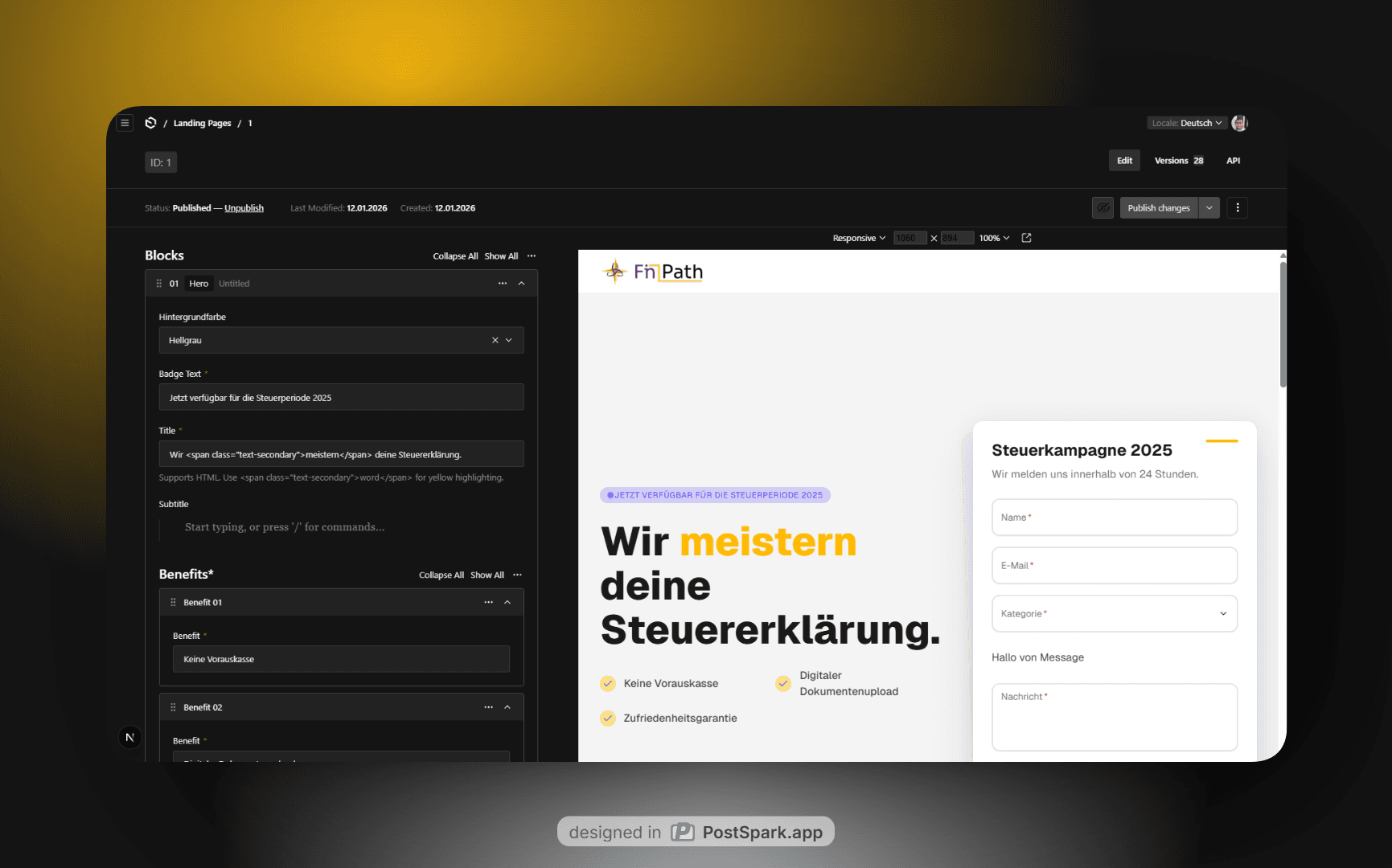
To tie everything together, we simply connect these forms to our landing page content by adding a relationship field within our Blocks. In the example below, you can see how our HeroBlock is structured: it allows advisors to select their background color and text, but most importantly, it includes a direct link to the forms collection. This means an advisor can build a custom form first and then simply "plug it in" to their landing page hero section with a single dropdown.
1const HeroBlock: Block = {
2  slug: "hero",
3  fields: [
4    {
5      name: "bg",
6      type: "select",
7      label: "Hintergrundfarbe",
8      defaultValue: "white",
9      options: [
10        { label: "Weiß", value: "white" },
11        { label: "Hellgrau", value: "gray" },
12        { label: "Sekundär (Gelb)", value: "secondary" },
13        { label: "Primär (Violett)", value: "primary" },
14        { label: "Zinc (Dunkelgrau)", value: "zinc" },
15      ],
16    },
17    {
18      name: "badgeText",
19      type: "text",
20      required: true,
21      defaultValue: "Jetzt verfügbar für die Steuerperiode 2025",
22    },
23    {
24      name: "title",
25      type: "text",
26      required: true,
27      admin: {
28        description:
29          'Supports HTML. Use <span class="text-secondary">word</span> for yellow highlighting.',
30      },
31    },
32    {
33      name: "subtitle",
34      type: "richText",
35    },
36    {
37      name: "benefits",
38      type: "array",
39      maxRows: 5,
40      fields: [
41        {
42          name: "benefit",
43          type: "text",
44          required: true,
45        },
46      ],
47      required: true,
48    },
49    {
50      name: "form",
51      label: "Formular auswählen",
52      type: "relationship",
53      relationTo: "forms",
54      required: true,
55      admin: {
56        description:
57          "Wählen Sie das Kontaktformular aus, das im Hero-Bereich angezeigt werden soll.",
58      },
59    },
60  ],
61};
Bridging the Gap: Secure Real-Time Previews
To provide a truly streamlined experience, it was essential that advisors could see their changes in real-time. By providing a live preview route—the same one used for the final production page—users can view the output of their blocks and configurations side-by-side with the Admin UI.
Payload provides excellent out-of-the-box support for this via the admin.livePreview configuration. This allows us to define which collections support previews and where those previews should point.
1export default buildConfig({
2  admin: {
3    livePreview: {
4      url: ({
5        collectionConfig,
6        data,
7      }) => {
8        let path: string | undefined;
9
10        if (collectionConfig) {
11          switch (collectionConfig.slug) {
12            case "landing-pages":
13              path = `/api/landing-pages/${data.id}/draft?secret=${process.env.DRAFT_MODE_SECRET}`;
14              break;
15          }
16        }
17
18        if (!path) return;
19
20        return getPublicURL(path).toString();
21      },
22      collections: ["landing-pages"],
23    },
24  }
25})
With this configuration, we point Payload toward a custom API route designed to "upgrade" the session into Draft Mode. This is a critical step: it allows advisors to iterate on their designs and content without having to hit "Publish" every time they want to see an update.
Our API route leverages Next.js draftMode().enable() to set the correct cookies before redirecting the user to the actual landing page. To close the loop, we include Payload's RefreshRouteOnSave React component within that page. This component listens for window messages sent from the Payload CMS to the preview iframe; whenever a save occurs, it triggers a router.refresh(), ensuring the advisor always sees the most current version of their work.
1import { NextRequest } from "next/server";
2import { draftMode } from "next/headers";
3import { redirect } from "next/navigation";
4
5export async function GET(
6  request: NextRequest,
7  { params }: RouteContext<"/api/landing-pages/[id]/draft">
8) {
9  const { searchParams } = new URL(request.url);
10  const secret = searchParams.get("secret");
11
12  const { id } = await params;
13
14  if (secret !== process.env.DRAFT_MODE_SECRET) {
15    return new Response("Invalid token", { status: 401 });
16  }
17
18  // Enable Draft Mode by setting the cookie
19  const draft = await draftMode();
20  draft.enable();
21
22  redirect(`/landing-pages/${id}`);
23}
The Traffic Controller: Orchestrating Multi-Domain Routing with next-intl
This brings us to the core of the implementation. Thanks to our live preview setup, we’ve already done much of the heavy lifting required to display the landing page when a user visits its public URL.
The url field in our collection configuration is the key. We use it to determine whether an incoming request should be handled by our default application (the PayloadCMS admin and main site) or routed to a specific landing page. To keep the URLs clean, we leverage Next.js rewrites. This allows us to map the advisor's custom domain to our internal page structure without forcing an "ugly" internal URL onto the visitor's browser.
However, integrating next-intl added a layer of complexity. When using localized pathnames to translate routes across different languages, we need to integrate the next-intl middleware directly into our proxy handler. This requires "introspecting" the middleware's response to see if it triggered a 307 redirect (for example, moving a user from the default /de to the root /) or a rewrite. If it's a rewrite, we intercept the path and prepend our /landing-pages/:id prefix, ensuring Next.js serves the exact same route we built for the live preview.
To make this data accessible deeper in our application, we also inject a custom x-landing-page-id header during the rewrite process. This is a lifesaver for Server Components; by using await headers(), any component in the tree can instantly identify which campaign it belongs to and fetch the correct data without having to parse the URL again.
1const handleI18nRouting = createMiddleware(routing);
2
3export default async function proxy(request: NextRequest) {
4  const { nextUrl } = request;
5  const headers = new Headers(request.headers);
6
7  const origin =
8    headers.get("X-Forwarded-Proto") && headers.get("X-Forwarded-Host")
9      ? `${headers.get("X-Forwarded-Proto")}://${headers.get(
10          "X-Forwarded-Host"
11        )}`
12      : nextUrl.origin;
13
14  let landingPageId: string | null = null;
15  if (!headers.get("x-landing-page-id")) {
16    const payload = await getPayload({ config: payloadConfig });
17
18    const { docs } = await payload.find({
19      collection: "landing-pages",
20      where: {
21        url: { equals: origin },
22      },
23      limit: 1,
24    });
25
26    if (docs.length) {
27      landingPageId = docs[0].id.toString();
28    }
29  } else {
30    landingPageId = headers.get("x-landing-page-id");
31  }
32
33  if (landingPageId) {
34    let locale: Locale | null = null;
35
36    for (const l of routing.locales) {
37      if (
38        nextUrl.pathname.startsWith(`/${l}/`) ||
39        nextUrl.pathname === `/${l}`
40      ) {
41        locale = l as Locale;
42        break;
43      }
44    }
45
46    const prefix = `/landing-pages/${landingPageId}`;
47
48    const fullPath = locale
49      ? `/${locale}${prefix}${nextUrl.pathname.replace(`/${locale}`, "")}`
50      : `${prefix}${nextUrl.pathname}`;
51
52    nextUrl.pathname = fullPath;
53
54    const resp = handleI18nRouting(request);
55
56    headers.set("x-landing-page-id", landingPageId);
57
58    if (resp.headers.get("location")) {
59      return NextResponse.redirect(
60        resp.headers.get("location")!.replace(prefix, ""),
61        { headers }
62      );
63    }
64
65    return NextResponse.rewrite(
66      resp.headers.get("x-middleware-rewrite") ??
67        new URL(
68          locale ? fullPath : `/${routing.defaultLocale}${fullPath}`,
69          nextUrl.origin
70        ),
71      { request: { headers } }
72    );
73  }
74
75  if (!nextUrl.pathname.startsWith("/admin")) {
76    return handleI18nRouting(request);
77  }
78
79  return NextResponse.next({ request });
80}
Note: We are using
proxy.ts, which is the equivalent ofmiddleware.tsin Next.js versions prior to v16.
The Result: A Unified Campaign Experience
By moving the entire layout—including the navbar, footer, and branding—directly into the landing page component, we achieved a clean separation of concerns. Our main application remains lean, while each landing page acts as a fully self-contained "micro-site."
When an advisor selects a theme or adds a block in Payload, the Next.js frontend responds dynamically. Because we’ve mapped everything through our proxy with next-intl and the x-landing-page-id header, the transition from "Draft" to "Live" is instantaneous.
Conclusion: Scale without the Headache
This architecture solved three major pain points for our client:
- Speed to Market: Advisors no longer wait for a developer to deploy a new campaign. They can go from idea to a live
finpath.chsubdomain in minutes. - Global Reach: With
next-intlbaked into the routing logic, localization isn't an afterthought—it’s a default. - Data Integrity: By utilizing the Payload Form Builder, lead generation is standardized and secure, giving advisors a reliable way to grow their business.
Building a multi-domain engine like this takes some initial setup in the middleware, but the payoff is a powerful, zero-code platform that lets your technical team focus on building new features instead of shipping static CSS changes.